You finally got a term sheet. The investor asks for access to your data room to begin legal and financial due diligence. If your response is a link to a messy Google Drive folder with wide-open permissions, you signal amateur status. You do this at the exact moment you need to project competence.
A virtual data room (VDR) is not a luxury. It is a fundamental requirement for securing capital. However, enterprise VDRs can cost thousands of dollars per month. This makes them impossible for early-stage companies to afford.
This startup virtual data room software comparison cuts through the enterprise marketing. We evaluate the best secure document sharing tools based on what founders actually need. We look at security, analytics, and speed, all without the enterprise price tag.
Quick Takeaways:
Best for Series A+: iDeals and Firmex offer strong, compliance-heavy solutions.
Best for quick M&A: CapLinked provides smooth collaboration and tracking.
Best budget options: Digify and Peony deliver core VDR features at a fraction of the cost.
Best free alternative: Notion can act as a VDR for pre-seed founders with zero budget.
The golden rule: Never use standard cloud storage for sensitive due diligence documents.
Why Startups Need a Dedicated Virtual Data Room
When you are simply sharing a pitch deck, email or DocSend works fine. But when due diligence begins, the game changes. You are sharing employee contracts, cap tables, intellectual property filings, and raw financial data. Compare best DocSend alternatives for pitch deck tracking for lighter use cases.
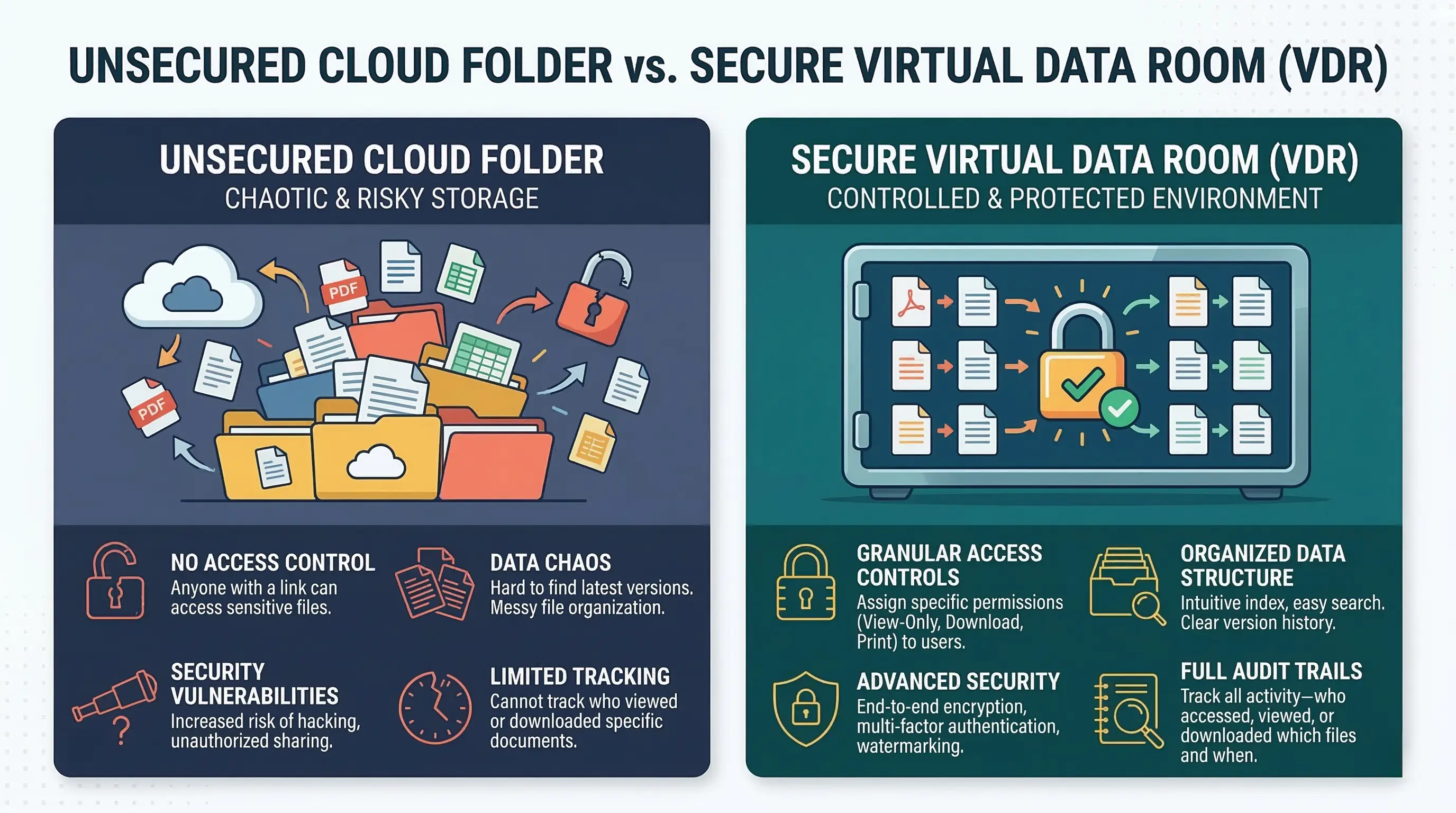
Standard cloud storage tools like Dropbox or Google Drive fall short in three critical areas during due diligence:
Granular Permissions: You cannot easily restrict a user from downloading or printing a document.
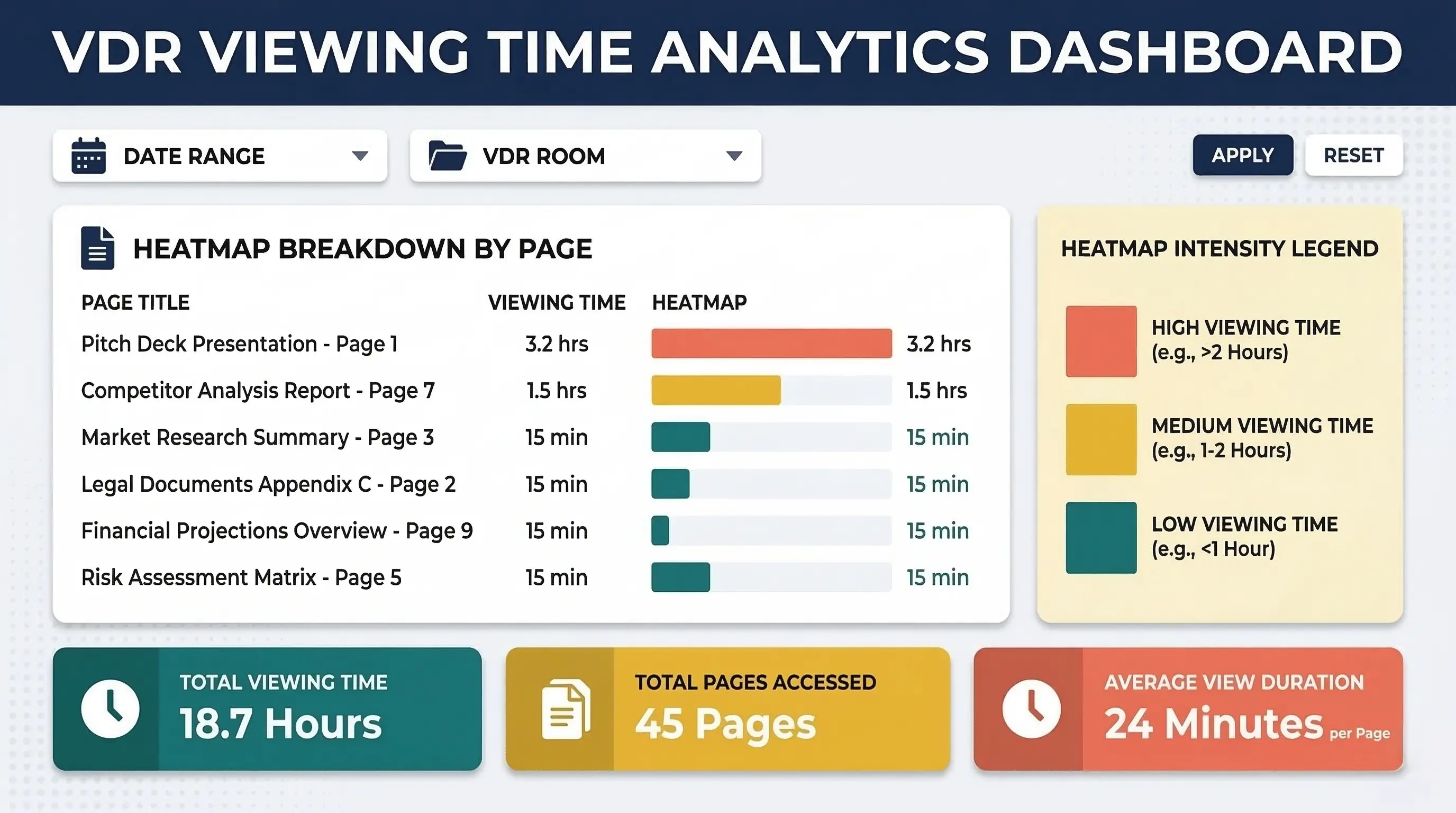
Document Analytics: You cannot see which specific pages an investor spent the most time reading.
Audit Trails: You lack a legally defensible record of exactly who viewed what and when.
A dedicated due diligence dataroom solves these problems. It protects your trade secrets. It gives you a critical advantage. When you know an investor spent forty minutes reviewing your financial projections, you know they are serious. If they skipped your team slides entirely, you know exactly what to address strings in your next meeting.
Startup Virtual Data Room Software Comparison
When evaluating VDR software reviews, you must look past the enterprise features you do not need yet. We assessed the top options based on their utility for early-stage startups.
Tool | Best For | Price | Key Feature |
|---|---|---|---|
Peony | Pre-seed startups | Free to $40/mo | AI-powered analytics and "burn-after-reading" |
Digify | Budget-conscious teams | Flat-rate (affordable) | Easy setup with dynamic watermarking |
Notion | Zero-budget founders | Free to $10/mo | Highly configurable with templates (Notion Rooms) |
CapLinked | Fundraising & M&A | Tiered (mid-market) | Real-time tracking and SOC 2 compliance |
iDeals | Complex due diligence | Custom (enterprise) | Multilingual support and advanced Q&A workflows |
Firmex | High-volume document sharing | Custom (unlimited) | Transparent audit tracking and bulk uploading |
Budget-Friendly and Free VDR Alternatives for Pre-Seed
If you are raising less than a million dollars, you do not need a custom enterprise solution. You need speed, basic security, and affordability. These tools deliver the best virtual data room for startups without breaking the bank.
1. Peony: The AI-Native Disruptor
Peony positions itself strictly for startups. It is built for speed and transparency. It offers an affordable solution that does not compromise on core security.
Its standout feature is page-by-page document analytics. You see precisely where investors pause. Beyond that, it offers "burn-after-reading" functionality, automatic watermarks, and built-in eSignatures. Because it includes a generous free tier and paid plans maxing out around $40 per month, it is currently the most compelling free dataroom for startups on the market.
2. Digify: The Pragmatic Choice
Digify strikes the perfect balance between affordability and professional security. It supports smaller transactions beautifully by offering flat-rate pricing. You do not have to pay per page or per gigabyte.
Startups love Digify for its dynamic watermarking and strict print/download restrictions. It integrates natively with Google Drive and Dropbox. This allows you to build the data room quickly. While it lacks advanced Q&A modules found in enterprise tools, its straightforward document tracking makes it a highly effective due diligence dataroom.
3. Notion: The Configurable Workspace
Notion is not inherently a virtual data room. It is a workspace. However, clever founders use "Notion Rooms" or custom templates to turn it into a highly effective, zero-cost VDR.
By carefully configuring access permissions, you can create a safe environment. Restricting editing rights and password-protecting specific pages allows you to securely share due diligence materials. Tools like Papermark integrate with Notion to add document analytics and secure sharing capabilities. If you already run your startup on Notion, this is the lowest-friction way to share your data. Learn how to password protect a pitch deck for individual document security.
Top Tier VDRs for Series A and Beyond
Once you raise a Series A or enter an M&A process, the stakes rise. You will have multiple institutional investors, lawyers, and auditors reviewing thousands of files simultaneously. Here, the investment in enterprise-grade software pays off.
4. CapLinked: The M&A Specialist
CapLinked is designed explicitly for complex financial transactions. It provides excellent collaboration tools and customizable permissions that adapt as the deal progresses.
Its primary strength is its advanced cybersecurity infrastructure. This includes digital rights management and strict SOC 2 compliance. CapLinked ensures that when a deal closes, you retain complete control. If the deal falls apart, you can instantly revoke access to all downloaded documents. This ensures your intellectual property remains yours.
5. iDeals: The Feature-Rich Standard
iDeals is widely considered one of the most capable VDRs available. It combines an intuitive user interface with extreme security measures.
It meets global compliance standards like GDPR and HIPAA effortlessly. Its standout feature is its advanced Q&A workflow. During a major raise, investors will ask hundreds of questions. iDeals routes these questions directly to the relevant team member within the secure environment. For instance, it routes legal questions to your lawyer and financial questions to your CFO automatically.
6. Firmex: The High-Volume Workhorse
Firmex is favored by legal and financial professionals for its reliability. It is built to handle massive volumes of sensitive documents.
Startups transitioning into growth stages benefit greatly from Firmex. It offers bulk uploading, auto-indexing, and lockdown document capabilities. While its pricing is prohibitive for pre-seed founders, its unlimited, non-tiered plans offer predictable costs. This is perfect for companies engaged in continuous fundraising or acquisition strategies.
Key Features Every Founder Must Look For
When making your own startup virtual data room software comparison, do not get distracted by bells and whistles. Focus strictly on these three capabilities.
1. Granular Security Permissions You must be able to prevent printing, block downloading, and restrict forwarding. The software must allow you to revoke access instantly. This must hold true even if the document was already downloaded to a local machine.
2. Page-Level Analytics Knowing an investor opened your data room is useless. Knowing they spent fifteen minutes on your competitor analysis gives you a tactical advantage. Knowing they spent thirty seconds on your financial projections tells you what to prep for the next call. Prioritize VDRs that offer heatmap analytics.
3. Frictionless User Experience Investors review dozens of deals a week. If your VDR requires them to download proprietary software, they will likely pass. If it forces them to install plugins or navigate a clunky VPN, they will simply move on to the next pitch. The best virtual data room for startups is the one that loads instantly in a standard web browser without any friction.
How to Organize Your Startup Data Room
Software is only as good as the organization behind it. A chaotic iDeals data room is worse than a perfectly organized Notion page.
Structure your VDR logically. Create parent folders for Corporate Documents, Financials, Intellectual Property, HR and Team, and Product Architecture. Number the folders so they sort sequentially. For example, use numbers like "01_Corporate_Docs" and "02_Financials". Keep file names clear and consistent. Provide an index document at the root level that explains exactly where everything lives.
When you make the investor's job easy, you send a strong message. You signal that you will be an organized, competent CEO to work with post-investment. This creates trust.
Improve Your Pitch Execution Before Due Diligence
Your virtual data room houses the raw data. But no investor digs into your corporate bylaws until they are captivated by your narrative. The gateway to your data room is your pitch deck.
If you have brilliant unit economics but your pitch deck looks like a late-night college project, investors will never reach the due diligence phase. Visual execution matters immensely.
This is where Zyner accelerates your raise. Our unlimited design subscription provides startups with a dedicated design team and a project manager. We specialize in designing fundraising pitch decks. We communicate your vision with the polish of a Series B company. We handle the creative heavy lifting, delivering custom, high-converting slides so you can focus on building relationships and closing the round.
Secure Your Data, Secure Your Deal
The days of emailing sensitive financial spreadsheets are over. Choose a VDR that matches your stage. If you have zero budget, lock down a Notion workspace. If you have a few hundred dollars, implement Peony or Digify for professional analytics.
Do not wait until the term sheet arrives to build your data room. Organize your files this weekend. When the investor asks for diligence materials, sending a secure, fully populated VDR link within five minutes proves you are ready to scale. Use this startup virtual data room software comparison to make your choice today.
Frequently Asked Questions
What is a virtual data room?
A virtual data room is a highly secure cloud system. Startups use it to store and share sensitive files. It is necessary during fundraising, due diligence, and mergers. It tracks who views what. It also prevents unauthorized downloading or printing.
Is a virtual data room overkill for a pre-seed startup?
No. An enterprise VDR is overkill, but secure document sharing is mandatory. Pre-seed startups should use budget alternatives like Peony or Digify to protect intellectual property and track investor engagement safely.
How much does a startup VDR cost?
Costs vary wildly based on the provider. Configured workspaces like Notion can be free. Startup-focused tools like Peony and Digify range from $30 to $150 per month. Enterprise solutions like iDeals or Firmex often start in the thousands.
What is the difference between a VDR and Google Drive?
Google Drive is built for open collaboration and easy sharing. A VDR is built for strict restriction and auditing. VDRs offer granular control, such as blocking screen captures, applying dynamic watermarks, and revoking access to files after they are downloaded.
Can I use Notion as a data room?
Yes. By carefully using page permissions and restricting sharing settings, founders can use Notion. You can configure a Notion workspace to function as a lightweight, zero-cost data room. However, refer back to our startup virtual data room software comparison if you need strong analytics.