Feb 25, 2026
Every hour you spend aligning text boxes in a pitch deck is an hour you aren’t talking to users, refining your product, or actually pitching investors.
If you’re a pre-seed or seed-stage founder getting ready to raise capital in 2026, you’ve likely hit the inevitable software roadblock: Figma vs. Canva. You need a deck that looks professional enough to secure meetings, but you don't have time to master complex design software.
Canva is ideal for quick, template-driven, and user-friendly pitch decks suitable for beginners or rapid, non-designer content creation. Figma is superior for professional-grade design, complex layouts, and detailed, custom-styled presentations for designers and advanced teams. Both excel in real-time, cloud-based collaboration.
The real question isn't just which tool has better features. The question is: What is the most effective use of a founder's time?
Let’s break down how Canva and Figma handle pitch decks, where each tool shines, and why the smartest founders often choose a third option entirely.
Quick Takeaways: Figma vs. Canva for Pitch Decks
Speed vs. Precision: Canva gets you a functional draft in hours. Figma gives you pixel-perfect control but takes days to master.
The Template Advantage: Canva has over 20,000 presentation templates. Figma relies more on community files and custom UI kits.
Figma Slides Changes the Game: Figma’s new dedicated presentation tool bridges the gap, allowing for interactive prototypes directly inside your deck.
The Founder's Trap: Spending 40 hours learning Figma to design a deck costs thousands of dollars in lost founder time.
The Zyner Solution: Outsourcing Figma design to an expert team like Zyner saves $250k+ annually compared to in-house hires while delivering VC-ready quality.
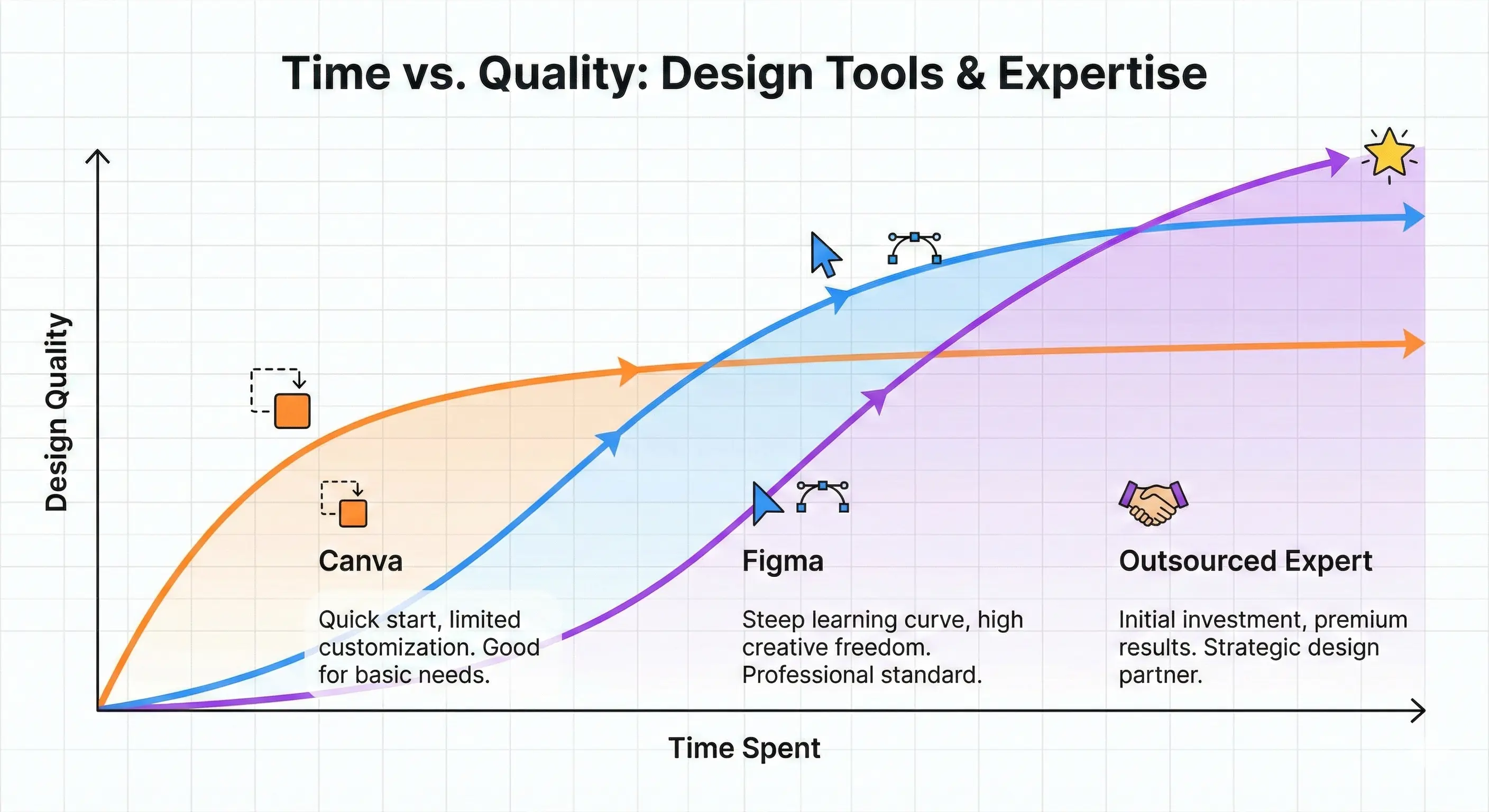
The Pre-Seed Dilemma: Time vs. Design Quality
When you’re a pre-seed founder, you are the product manager, the head of sales, the lead recruiter, and the janitor. You are validating a hypothesis with very little cash.
You know that investors see hundreds of pitch decks a week. A sloppy, unpolished deck signals a lack of attention to detail. But a hyper-polished deck that took three weeks to build means you stopped building your company for nearly a month.
This creates the classic founder dilemma: You must balance the speed of execution against the quality of the output.
Choosing between Figma and Canva isn't about layer masks and vector networks. It's about deciding whether you want to constrain your creativity to move fast (Canva) or build a bespoke system that requires deep expertise (Figma).
Canva For Pitch Decks: Speed and Templates
Canva’s entire worldview is that design should be accessible to everyone. They didn't build a design tool; they built a content creation engine disguised as a design tool.
If you need a pitch deck tomorrow morning and you have zero design experience, Canva is your best bet.
The Good: Why Canva Works for Startups
Zero Learning Curve: The drag-and-drop interface is intuitive. You open it, grab a template, click the text, and start typing. No tutorials are required.
Massive Template Library: Canva reportedly has over 20,000 presentation templates. You can search for "SaaS pitch deck" or "Hardware seed deck" and find dozens of starting points.
Built-In Assets: You don't need to hunt for stock photos, icons, or graphics. Canva’s library contains millions of assets you can drop directly onto a slide.
Brand Controls: If you set up a Brand Kit, you can lock down colors and fonts so your co-founder doesn't accidentally use Comic Sans on the financial projections slide.
The Bad: Where Canva Falls Short
The "Canva Look": Because millions of people use the same templates, Canva decks often look generic. Investors can spot a standard Canva template from a mile away.
Rigid Constraints: When you need to do something slightly complex—like mapping out a highly detailed architectural diagram or adjusting the kerning on a specific headline—Canva fights you. It prioritizes ease of use over deep customization.
No True Prototyping: You cannot embed a functional, clickable prototype of your app directly into a Canva slide.
Pro Tip: If you use Canva, do not use the first template you see. Mix and match layouts from 3-4 different templates and apply your own distinct brand colors to avoid the "cookie-cutter" aesthetic.
Figma For Pitch Decks: Customization and Professional Polish
Figma approaches design fundamentally differently. Figma believes that good brand work requires systematic thinking and design expertise. They give you incredibly powerful tools, assuming you know how to use them.
For years, Figma was the tool designers used to build the app, while founders used PowerPoint or Canva for the deck. That changed recently.
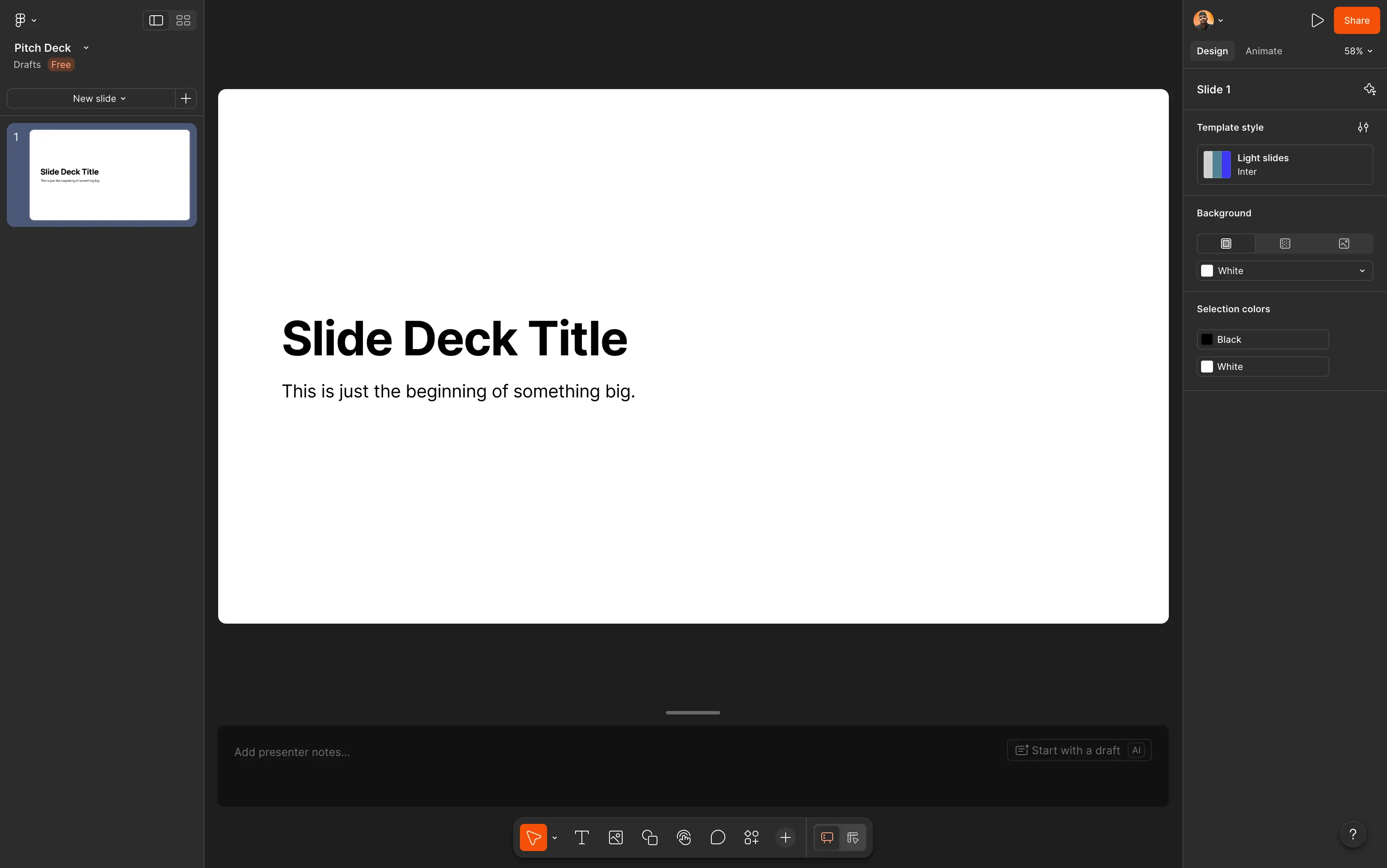
The Rise of Figma Slides
Historically, presenting in Figma meant hacking together "frames" and using the prototype view to click through them. It worked, but it was clunky.
Now, Figma has launched Figma Slides, a dedicated presentation tool built directly into the platform. This was a massive shift. Figma Slides brings the precision of Figma’s core design engine into a format specifically meant for pitching and presenting.
The Good: Why Figma Wins on Quality
Pixel-Perfect Control: Figma offers unmatched precision. Vector networks, auto-layout, and variable fonts mean you can design exactly what is in your head, down to the last pixel.
Interactive Prototypes: This is Figma's killer feature for startups. You can embed a fully clickable prototype of your product directly into your pitch deck slide. When you hit the "Demo" slide, you aren't showing a screenshot; you are showing actual interaction.
Design Systems: If your startup already uses Figma for product UI, you can pull your exact buttons, fonts, and brand components directly into your deck. The consistency is flawless.
Developer Handoff: While less relevant for a pure pitch deck, if your deck includes UI concepts that will eventually be built, your engineers can inspect the code directly from the file.
The Bad: The Figma Steep Learning Curve
It Takes Time: Figma is professional software. Concepts like constraints, auto-layout, and components take time to understand. If you don't know what you are doing, you will break the layout constantly.
Fewer Out-of-the-Box Templates: While the Figma Community is growing, you won't find 20,000 ready-to-go pitch deck templates like you do in Canva. You often start from scratch or a bare-bones wireframe kit.
Figma vs. Canva: Feature Breakdown
To make the comparison concrete, here is how the two platforms stack up across the features that matter most for building a pitch deck.
Feature | Canva | Figma (with Figma Slides) |
|---|---|---|
Learning Curve | Very low. Anyone can use it immediately. | High. Requires design fundamentals. |
Templates | 20,000+ native presentation templates. | Limited. Relies on Community files. |
Customization | Basic to intermediate. Hard to break the grid. | Infinite. Pixel-perfect vector control. |
Prototyping | Basic click-through links. | Advanced. Embed clickable app prototypes. |
Speed to First Draft | Hours. | Days (if you are learning the tool). |
Visual Polish | Good, but can look generic. | Exceptional, VC-ready quality. |
The Hidden Cost: Why Founders Shouldn't Open Figma
Let's look at the unit economics of founder time.
If you are a technical founder, your time is worth at least $150 to $250 an hour. Let's assume you decide to build your seed deck in Figma because you want the interactive prototypes and the professional polish.
Because you aren't a senior designer, it takes you 40 hours to learn the auto-layout system, build the components, align the slides, and finalize the deck.
40 hours × $200/hour = $8,000 of your time.
That $8,000 wasn't spent talking to customers. It wasn't spent coding the core product. It wasn't spent networking with investors. It was spent aligning text boxes.
This is the hidden cost of "do it yourself" design. Tools like Figma give you incredible power, but they demand your time in return. Canva gives you back your time, but caps your quality ceilings.
As a founder, you should not be designing slides. Your job is to define the narrative, clarify the business model, and gather the data. The actual execution of the visual design is a task that should be delegated.
Pro Tip: Write your entire pitch deck in a plain Google Doc first. Do not open Canva or Figma until the narrative structure is bulletproof. Design cannot fix a broken story.
The Third Option: Expert Design Without the Bottleneck
So, Canva is too generic, and Figma takes too much of your valuable time. How do you get a bespoke, VC-ready Figma pitch deck without spending 40 hours building it yourself or paying an agency $15,000?
You use a design subscription built for startups.
This is exactly why we built Zyner. We realized that founders were burning ridiculous amounts of runway and time trying to hack together professional designs.
Zyner provides an unlimited design subscription tailored specifically for startups. For a flat monthly fee, you get access to a dedicated team of senior designers and a project manager who handle your creative execution.
How Zyner Solves the Pitch Deck Dilemma:
We Use Figma (So You Don't Have To): We deliver all our pitch decks, UI/UX, and web design in Figma. You get the world-class, custom polish of a premium Figma file without having to learn how auto-layout works.
Speed Execution: We onboard new clients within 24–48 hours. When you drop a pitch deck task into Slack, our senior designers start executing immediately.
Iterative Polish: Startups pivot. Your deck will change after your first three investor meetings. With Zyner’s unlimited revisions, you just drop the feedback in Slack, and we update the Figma file.
Massive Cost Savings: Hiring a senior designer in-house takes 4-8 weeks and costs $120k+ a year. Zyner saves startups $250k–$450k+ annually compared to maintaining an internal design team, and you can pause or cancel anytime.
Let's do the math again. Instead of spending 40 hours ($8,000 of your time) failing to make Figma look good, you write the narrative in a simple doc, hand it to Zyner, and get back to building your product. Learn more in our guide to Outsourced Design Services: The Ultimate Guide.
Conclusion: What is the best pitch deck builder?
The best pitch deck builder depends entirely on your constraints and your goals.
Choose Canva if: You are a solo founder bootstrapping a small project, you need a deck by 5 PM today, and you are pitching to a local grant committee or friends and family. Speed is your only metric.
Choose Figma (and design it yourself) if: You are a professional UI/UX designer raising for your own startup and you already know the tool inside and out.
Choose Figma + Zyner if: You are raising a serious Pre-Seed or Seed round from institutional VCs. You need top-tier, custom design to stand out, but you understand that your time as a founder is too valuable to spend pushing pixels.
Your pitch deck is often the first impression an investor gets of your company. It needs to demonstrate clarity, focus, and professionalism. Don't compromise your narrative with generic templates, and don't compromise your product timeline by becoming a part-time graphic designer. Let the experts build the deck so you can build the company.
For more insights on how to position your company visually, check out our guide on Branding for Startups, or see how professional design impacted a real raise in our case study on How DianaHR Raised $3.7M Seed With Strategic Design.
FAQs
Is Canva good for pitch decks?
Yes, Canva is excellent for creating functional pitch decks quickly. It provides thousands of pre-made templates and an intuitive drag-and-drop interface, making it perfect for non-designers who need to iterate fast. However, it lacks the deep customization and interactive prototyping features required for highly complex, bespoke presentations.
Can you make a pitch deck in Figma?
Yes, you can absolutely make a pitch deck in Figma. With the recent launch of Figma Slides, creating presentations is smoother than ever. Figma allows for pixel-perfect customization, advanced design systems, and the ability to embed fully clickable product prototypes directly into your slides.
Is Canva or Figma better for presentations?
If you prioritize speed and ease of use, Canva is better for presentations due to its massive template library and simple UI. If you prioritize custom design, precise alignment, and interactive product demos, Figma (specifically Figma Slides) is the superior choice.
Why is Figma better than Canva?
Figma is better than Canva for professional teams because it offers infinite customization, powerful design systems with reusable components, and advanced prototyping. Unlike Canva’s template-driven approach, Figma gives designers total control over every vector, spacing rule, and interactive element.
What is the best pitch deck builder?
The best pitch deck builder depends on your skills. For beginners needing speed, Canva is best. For professional designers, Figma is best. However, for startup founders, the best approach is often writing the narrative in Google Docs and outsourcing the design to experts to save valuable founder time when creating your ultimate Figma vs. Canva pitch deck.